
Confluve Premium
Read and listen without limits.
Confluve is free for up to 5 sources. Premium is one purchase, never a subscription, and it unlocks on your iPhone, iPad and Mac.
Updated
What Premium adds
Unlimited Sources
Add as many news and podcast sources as you like. Import an OPML file of any size.
Smart Folders
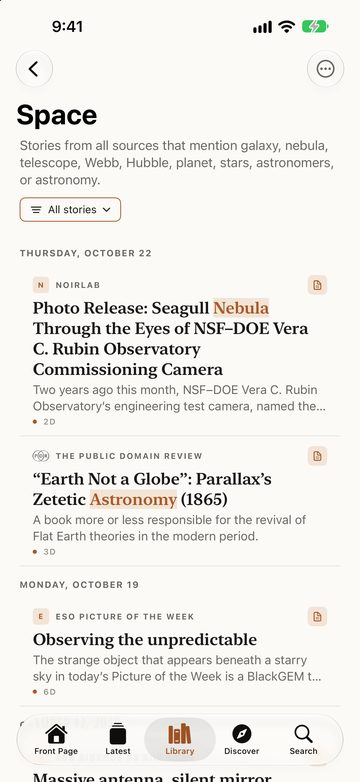
Gather stories from every source by the words, sources and kinds you choose.
A smart folder holds rules, not stories: the words a story mentions or leaves out, the sources or categories it comes from, articles or podcasts, unread only, published today, this week or this month. A folder called Space can hold every story that mentions Mars, the Moon or NASA, from whichever source wrote it. Words match whole words, so “Apple” never catches “Applebee’s”. Folders sync, and each device fills them from its own stories.
Full Articles
Read the whole story in Confluve when a feed sends only a summary.
Tap Show Full Article and Confluve fetches the page from the publisher, finds the article in it and sets it in the reader. It happens only when you ask (or, if you choose, every time you open a story from a source you set to always show the full article). The request is a first-time visitor’s: no cookies sent or kept, no scripts run. The article is kept with the story on your device, and Search finds it. A page the publisher marks as reserved for subscribers is left alone; Open in Browser is the way to read it as a subscriber.
Playlists
Keep episodes and articles read aloud in lists of your own, and play one through Up Next.
Yours to Keep
One purchase, no subscription. It unlocks Premium on your iPhone, iPad and Mac. Features added to Premium later are yours too.
Free and Premium
| Feature | Free | Premium |
|---|---|---|
| Sources | Up to 5 | Unlimited |
| OPML import | Up to 5 sources | Any size |
| OPML export | Included | Included |
| iCloud sync | Included | Included |
| Front Page, Latest, Search, Discover | Included | Included |
| Read Later, Starred, pinned sources | Included | Included |
| Podcasts and downloads | Included | Included |
| Read Aloud | Included | Included |
| Continue Listening and Up Next | Included | Included |
| Smart folders | Not included | Included |
| Full articles | Not included | Included |
| Playlists | Not included | Included |
| iPhone, iPad and Mac | Included | Included |
| Ads | None | None |
iCloud sync, Read Aloud and OPML import and export stay free.
Questions
Is Premium a subscription?
No. You buy it once and keep it.
Does it work on all my devices?
Yes. Buy it on iPhone, iPad or Mac and it unlocks on the others signed in to the same Apple Account. On a new device, open Premium and choose Restore Purchases.
Can my family use it?
Premium belongs to the Apple Account that bought it.
What happens if I get a refund?
Confluve goes back to the free plan and deletes nothing. Five sources keep refreshing; the others pause and keep their stories. You choose which five refresh, and buying Premium again resumes them all.
How do I ask for a refund?
Purchases go through the App Store, so refunds do too, at reportaproblem.apple.com.
Screenshots show stories and pictures from ESO, NOIRLab/NSF/AURA, ESA/Webb, ESA/Hubble, NASA, CSA, The Public Domain Review, Our World in Data, Creative Commons, the FSFE and Free as in Freedom, used under their Creative Commons licences (CC BY 4.0, CC BY-SA 4.0, CC BY-SA 3.0 US). Their names and logos belong to them; showing them implies no endorsement. Credits and licences